1. Why are we starting to use Flowpass?
We want to offer a more modern and user-friendly platform with robust features for bookings, communication, news, and events.
2. When can I start using Flowpass?
You can start using Flowpass from April 13.
3. Do I have to create a new account?
Yes. All users need to create a new account in Flowpass.
You can download the app from the App Store or Google Play, or search for Flowpass in your phone’s app store. If you prefer using a browser, you can also register through the Flowpass web app.
Sign up using your work email address.
Confirm your email by clicking the link we sent you.
Once that is done, you are ready to explore the app, discover news and events, and request meeting and conference facilities at Level Two – Altitude Meetings.
4. How do I find news and events?
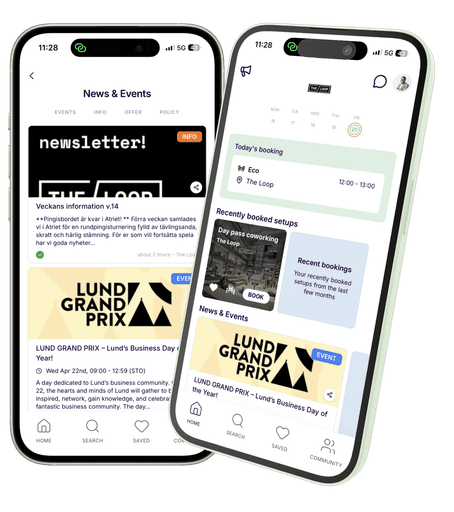
Log in to the Flowpass app and go to your Home screen, where you will find the news and event feed. You can also click the megaphone icon in the upper-left corner to view the full feed.
5. How do I find meeting and conference facilities at Level Two – Altitude Meetings?
When you are logged in to the app, click Search in the bottom navigation bar. You will then see The Loop workspace. Click it to enter, then select Space Details. From there, you can explore the meeting and conference rooms and submit a request based on your needs.
6. Will Flowpass cost me anything as a user?
No. Flowpass is free for you as a tenant employee at The Loop.
7. What should I do if something doesn’t work?
The Flowpass team will be on site on April 13 to help answer questions. You can also contact support at cs@flowpass.co.