1. Why are we starting to use Flowpass?
We want to offer a more modern, user-friendly platform with robust features for bookings, communication, and events.
2. When can I start using Flowpass?
You can start using Flowpass now, but bookings for meeting and conference rooms will open on March 23.
3. What will happen to my existing bookings?
You do not need to do anything. The current booking system will close down on March 20 in the late afternoon. All your existing bookings will automatically be transferred to Flowpass during the weekend before launch on March 23.
4. Will I be able to book directly on the screens outside the meeting rooms?
No. From March 23 onwards, all meeting room bookings must be made through Flowpass. However, your booking will still be displayed on the screen outside the room.
5. Do I have to create a new account?
Yes. All users need to create a new account in Flowpass.
You can easily download the app from the App Store or Google Play, or search for Flowpass in your phone’s app store. If you prefer using a browser, you can also register through the Flowpass web app.
Sign up using your work email address.
Confirm your email by clicking the link we sent you.
Once that is done, you are ready to start exploring the app, discovering events, connecting with the community, and booking workspaces as needed.
6. How do I book or find information and events?
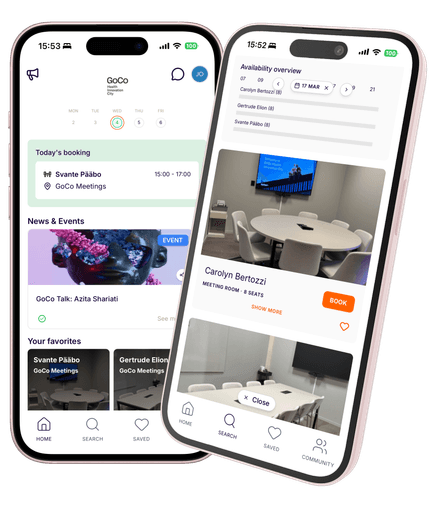
You log in to the Flowpass app and click search to find workspaces and meeting rooms. On your HOME screen in the app, you will find your bookings, information, offerings and events.
7. Will Flowpass cost me anything as a user?
No. Flowpass is free for you as a tenant/employee/member at the GoCo House or the Office Hub.
8. What will happen to the screens outside the meeting rooms?
It will no longer be possible to book meeting rooms directly on the screens, as all bookings must now be made through Flowpass. However, the screens will still display who has booked each meeting room.
9. What should I do if something doesn’t work?
The Flowpass team will be on site on March 25 to help and answer questions. You can also contact support at cs@flowpass.co.